The Legal Technology Business Case Guide
 7 chapters
•
7 chapters
•
 16 min read
In This Guide

How the legal tech buying process typically unfolds

The key stakeholders involved, and what matters most to them when evaluating a proposed new purchase

A step-by-step guide to building an effective business case for the legal technology you need and tips for addressing common objections and navigating the review process for AI-enabled tech
Table of Contents
Introduction
You’ve done the hard work of identifying your in-house legal team’s biggest pain points and matching them to the legal technology that would most effectively address them. Now it’s time to secure the budget and organizational buy-in to purchase your new legal tech tool.
Whether it’s your first time buying legal tech or you’ve made purchases in the past, the process can seem challenging. This is especially true now that tight organizational budgets have introduced increased layers of approval into the buying process. But once you have an understanding of the stakeholders involved, how the buying process typically unfolds in your organization, and best practices for building a compelling legal tech business case, the buying journey becomes significantly easier to navigate.
In this guide, we’ll leverage Brightflag’s extensive experience helping in-house teams secure budget and get approval to purchase legal tech to help you build a business case that gets you to “yes.” Here you’ll get a high-level overview of how the buying process typically unfolds—including a breakdown of the key stakeholders, what they value, and how to tailor your business case to their needs. And finally, we’ll touch on an increasingly important topic when it comes to onboarding new technology: How to prepare for a tool’s AI review and approval process.
Key Stakeholders and What They Value
The best way to start building the business case for a legal tech tool is by identifying the stakeholders in your organization who are involved in the purchasing process, and determining what is important to them. By understanding their challenges and objectives, you can ensure your business case resonates with them and is as impactful as possible.
Some stakeholders will have more influence on the buying process than others. And each stakeholder typically has their own set of priorities and values that you’ll need to appeal to when building and presenting your business case.
Here’s a breakdown of the stakeholders that are involved and what they typically care about. Note that the exact roles and priorities might be different in your organization.
| Stakeholder
|
Buying Role | Function | What They Value |
| Legal Operations/Other In-House Team Member | Champion | Advocates for the tech that the legal
department is looking to acquire, and builds the business case. If you’re reading this guide, chances are that you are the Champion. |
Operational
Efficiency, Time Savings, Cost Control |
| General Counsel | Decision-Maker | Buying hinges on getting the
Decision-Maker’s approval. Nothing progresses without their buy-in. |
Reducing Risk,
Improving Legal Service Delivery, Data for Strategic Decision-Making |
| CFO/ Procurement | Economic Evaluator | Approves the budget required to
make the purchase. One of the most influential stakeholders. |
Faster Revenue
Generation, Cost Savings, Return on Investment (ROI) |
| IT | Technical Evaluator | Assesses how compatible the
technology is with the organization’s current systems. They’ll also evaluate the technology’s security specifications. |
Ease of Integration,
Security, Data Compliance |
| Attorneys & Paralegals | Users | Users will directly interact with the
product. Their positive or negative perception of the tech can impact the decision to buy. |
Time Savings,
Improved User Experience |
| Other Departments (e.g. FP&A, Sales, Revenue Operations) | Influencers | Employees from other departments
who will be impacted by the technology, but don’t directly interact with it. Their positive or negative perception of the tech can impact the decision to buy. |
Time Savings,
Streamlined Workflows |
Mapping Out Your Buying Process
Now that you understand who the key stakeholders are and what they value, it’s time to map out where they fit into the buying process.
In order to provide a tangible and actionable example, below is a map of how the e-billing and matter management buying process typically unfolds, based on our experience guiding hundreds of customers through it here at Brightflag. Before you embark on your own buying process, be sure to consult with your finance and/or procurement teams to better understand
your organization’s specific requirements.
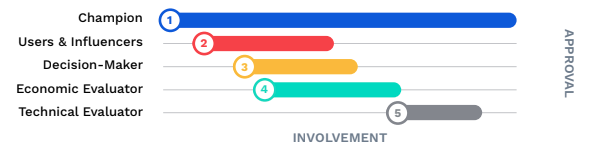
Note: If your organization issues a Request for Proposal (RFP), Procurement will typically project-manage the buying process from start to finish, including sending questions to the vendor and booking demos. Otherwise, Procurement will usually step in towards the end of the process to negotiate pricing.
① Champion kicks off the process by researching the legal team’s pain points and/or the problems they’re looking to solve, then identifies the category of legal tech that can be implemented to address these issues.
② Champion builds buy-in for preferred legal tech among Users and Influencers, showcasing examples of how the tool would improve their respective workflows. Users & Influencers can continue to be engaged throughout the buying journey to build support for the business case with other stakeholders.
③ Champion presents benefits of the tool to the Decision-Maker, leveraging User and Influencer feedback, as well as data tailored to the Decision-Maker’s values.
④ Business case focused on economic considerations (e.g. ROI, potential cost savings, better budgeting) is presented to Economic Evaluators. Note that Economic Evaluators are typically engaged after the Decision-Maker’s approval, though sometimes they are looped in simultaneously, as engaging with stakeholders early and consistently can improve the chances of having a purchase approved.
⑤ Technical Evaluators review the technology’s implementation process, security protocols, and AI functionality.
How Long Does the Buying Process Take?
While we’d love to be able to give you a clear-cut answer to this question, it ultimately depends on a variety of factors including the size of your organization and the structure of your buying process (e.g. RFP vs. no RFP).
One thing we can say is that the process can take longer than buyers think—which is why it’s so important to start the process early.
To speed things along, focus on building buy-in with Users and Influencers from the start, so that they’re pushing to get the tech implemented too. And don’t be afraid to engage with key stakeholders early and often so that they feel involved in the process. Getting a sense of IT and finance’s typical timeframe for approvals can also help with establishing an expected
approval date.
Gathering Insights on Legal Tech Providers
Now that you know each of the stakeholders that will be participating in the buying process— as well as where they fit in, and what they value—it’s time to gather the data your business case needs to be as compelling as possible.
Here are a few of the best places to find that data:

Platform Tours and Personalized Demos
There’s no better way to understand how a tool works than to see it in action.
Whether you choose to watch a platform tour or to partake in a personalized demo, this process will give you a more thorough understanding of the tool you’re considering.
Come with questions you anticipate stakeholders may have based on your previous research. Or bring interested stakeholders along for these demonstrations.

Success Stories
Legal teams that are already using the legal tech tool that you’re evaluating can offer objective, first-hand insights into the results it can deliver.
Consider pulling customer testimonials from these sources to bolster your buying committee’s faith in the platform you’re looking to purchase:
Case Studies: Your vendor will have several case studies that they can share with you to help illustrate the concrete results realized through their tool. Ask for ones that focus on organizations that addressed similar pain points to the ones your legal team is currently experiencing.
Customer Reviews: An independent review site like G2 can provide insight into the day-to-day user experience of the tool. They also offer the opportunity to see direct quotes from customers that you can then pull into your business case to bolster its impact.
Recommendations: Know others in your community that have experience with the software you’re considering? Don’t be afraid to reach out—direct conversations with trusted users can be invaluable for getting honest insights. We often recommend booking reference calls with clients of your preferred vendor(s). Message boards like CLOC’s can also be great places to garner input.

Sales Teams
Product demos and success stories can be incredibly impactful resources. But to really get the most out of them, be sure to lean on your preferred legal tech vendor’s sales representative. They’ll have the knowledge and experience to connect you with the information that will resonate most effectively with your stakeholders.
Your sales contact can also be instrumental in helping you gather concrete data on things like:
- The legal tech tool’s ROI and time savings
- Results that similarly sized/structured legal teams have seen from using the technology
- Security protocols, implementation timelines, and other technical information
Remember: Legal tech providers want to partner with you, so don’t be afraid to leverage their support to get all the information you need to build the best business case possible.
Building Your Business Case
To make a compelling business case, you’ll want to create a concise-yet-impactful presentation that you can bring to the various stakeholders on your buying committee.
Below are the key areas that your presentation should touch on. Note that this is a template— so be sure to customize each of the talking points so that they align with the values of the stakeholder that you’ll be presenting to.
Our experience at Brightflag comes from helping hundreds of legal teams build a business case for e-billing and matter management software. Given that, the examples shared below reference that category of legal technology. However, this framework can easily be applied to other categories of legal tech tools as well.
1. Executive Summary
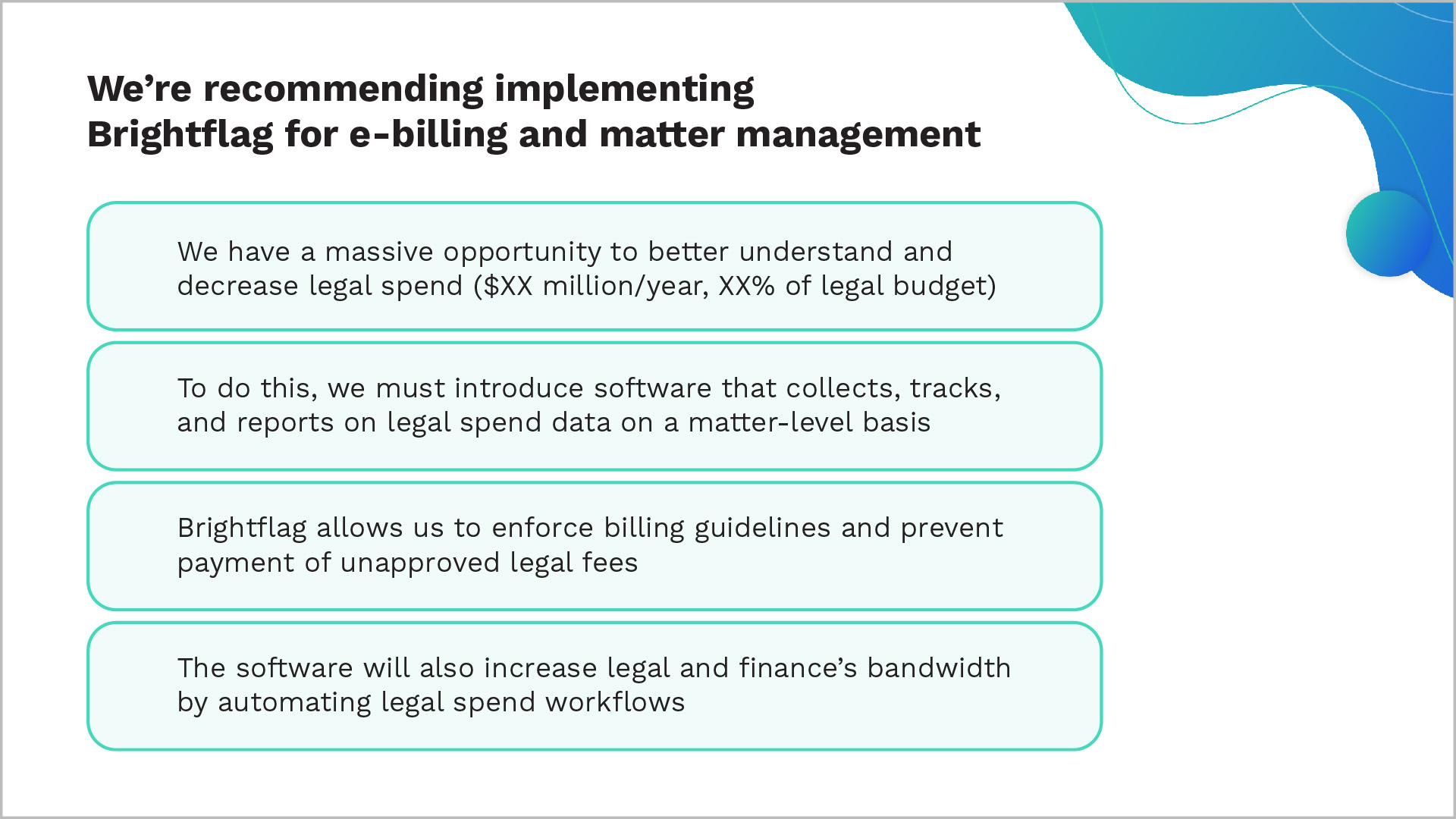
You should begin your presentation with an executive summary—a high-level overview that features a rundown of the major pain point(s) your in-house team is experiencing, or the business objectives they’re hoping to accomplish. It should also touch on how the legal tech tool you’re considering can help.
Note that because this slide will be summarizing much of the information referenced later in your business case, you’ll actually fill in the details of it last.
Here’s an example of what this slide might look like:
2. The Problems We’re Experiencing
While nobody wants to give a presentation on the things going wrong in the department, it is important to highlight the areas where efficiencies can be created, money can be saved, and/ or workflows can be improved.
For this slide, draw attention to the issues your legal team and wider organization are experiencing. Pull in the names of the people impacted by these pain points and specific examples of the issues they’re facing to ground them in reality.
Examples:
- “Our attorneys are spending X hours per week on low-value work like reviewing invoices.”
- “Our outside counsel guidelines are not being enforced, which is impacting our ability to
control legal costs.”
3. Why We Need to Solve Them Now
All of your stakeholders are busy people who are juggling numerous priorities.
So build urgency by underscoring how pressing the issues are, and what might happen as a result of inaction. The more you tie this argument back to your top-level objectives as an in- house team, and as a company, the more your case will resonate.
Examples:
- “Our annual objective is to reduce legal spend by X%, and we need a plan and solution
in place in order to achieve this.” - “Attorney sentiment is low and we’re at risk of attrition if we don’t help them reduce
and/or streamline their workloads.”
4. What the Future Looks Like
Outline the changes that the legal department (and the organization as a whole, where applicable) will experience as a result of having this legal tech solution in placel. This is where you’ll paint a picture of how much better things will be once the solution is implemented.
Examples:
- We’ll have a system of record for legal work: We can easily see which attorneys and law
firms are working on what, and how the work is trending, all in one place. - Effective control of legal spend: We’ll be able to automatically enforce rates and billing
guidelines, and we’ll no longer need to track our spend on budget spreadsheets.
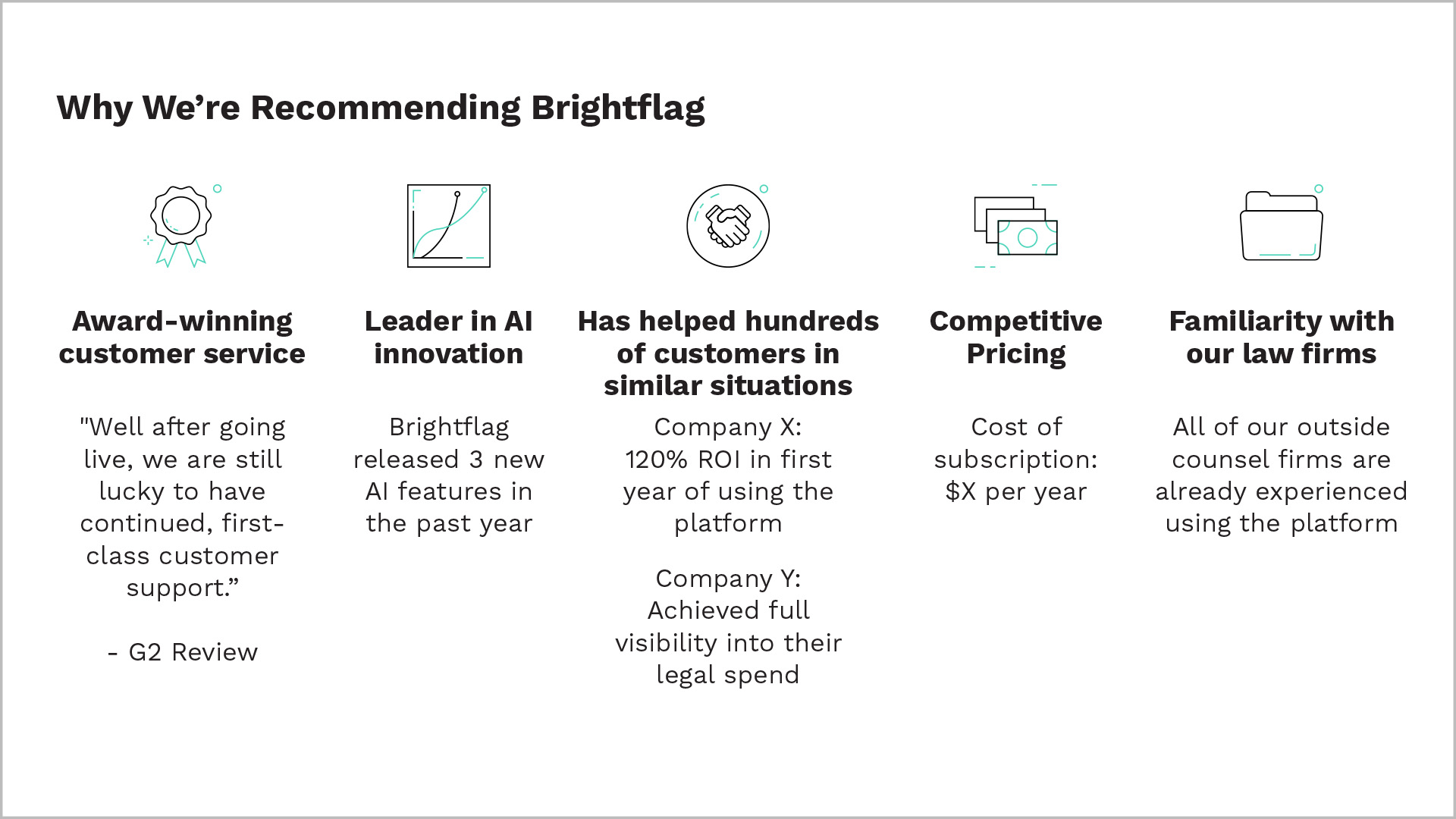
5. Why We’re Recommending This Legal Tech Provider
Call out the features that make the tech provider you’ve chosen stand out. For example, do they offer top-of-the-line AI functionality? Are they lauded for their customer service?
Pull in examples of companies similar to yours that saw results. This is where quotes and data you gathered earlier from the customer reviews, recommendations, and case studies will really stand out. Your preferred vendor’s website can be a great resource for this information as well.
6. Alternatives We’ve Considered
You can use this slide to pre-empt the objection that the work can be handled with an in-house solution, and showcase why other providers are not as viable.
Here are the three most common alternatives we see considered when it comes to e-billing, as well as why they’re not usually an ideal fit:
Using an AP system: AP systems don’t have the specialized features needed to address the unique challenges of managing legal spend.
Making an internal hire: New hires are often more expensive than technology solutions, and also create a single point of failure. In addition, hiring people to do manual work that is better addressed by technology won’t help position the legal department’s as a future-focused, innovative business partner.
Another legal tech vendor: Here you can underscore where other legal tech tools fell short compared to the one you’re advocating for (e.g. lack of innovation, poor reputation for customer support, etc.)
7. ROI Breakdown
Work with your legal tech vendor of choice to pull insights on potential cost savings and provide an in-depth breakdown of where savings will come from.
Common areas of cost savings we see realized with Brightflag include:

8. Outline Next Steps
Show who has already approved the business case, as well as the groups that have yet to see it. You can also include your target implementation and go-live dates to give stakeholders a sense of how quickly they can start seeing results after adding the tool.
Outlining these steps gives your stakeholders a clear idea of what needs to be done when and ensures everyone is on the same page. You can also create a sense of urgency here by underscoring the implications of not hitting specific go-live dates.
Common Objections to Anticipate
Given the amount of stakeholders involved in the buying process, some pushback is to be expected. Here are a few common objections that may come up, as well as some responses you can use to support your case.

We Don’t Have Enough Time to Implement a New System
Response: The only way to create more time is by improving systems and processes surrounding the legal team’s work. Investing some time now to get a legal tech solution up and running ends up paying compounding dividends down the road, as it frees up more time for your in-house team to focus on the work that matters most.
Choosing a vendor with fast implementation times, who does the heavy lifting of implementation for you, can also help address this concern. Here at Brightflag, for example, our average implementation time is just 45 days.
We Don’t Have Budget for a New Tool
Response: There is an established ROI with most legal tech tools, and savings can pay for the cost of the software several times over.
Here at Brightflag, for example, we’ve had customers recoup their annual subscription cost within the first 3 months. By-and-large, legal technology is an investment—not a cost.
Why Can’t Legal Use a Company-Wide System?
Response: Company-wide systems that can somewhat accommodate legal’s needs (e.g. Accounts Payable (AP) systems for legal spend, Google Drive/Sharepoint for documents) don’t fit well with legal’s use cases.
Having a dedicated piece of legal tech leads to greater efficiencies, better workflows, and ultimately less risk through providing better visibility into vital legal data.
Preparing for the AI Review and Approval Process
AI that’s incorporated into a legal tech tool can serve as a tremendous value multiplier when used effectively. Whether AI is flagging outside counsel guideline violations on invoices, or enabling easier reporting on legal data, it’s an invaluable asset that can have a huge impact on streamlining legal work.
However, the rise of AI functionality within legal tech tools introduces a new layer of security and privacy considerations that need to be addressed.
Companies often have a separate process for evaluating tools that feature AI components, so it’s worth asking your IT team about what your organization’s procedures are at the outset. This way you can gather the relevant data ahead of time.
Here are a few common questions that typically come up during the AI review process, and how to address them:

What security protections are in place to prevent data breaches?
Security is, of course, top-of-mind when it comes to the handling of legal data by an AI tool. The best AI providers will carry internationally recognized security certifications to give your legal team peace of mind. You’ll want to ensure your vendors are, at the very least, SOC 1 Type 2 and SOC 2 Type 2 compliant, and that they have ISO/IEC 27001 certification.
Do you/the model provider own any data, or is all our IP protected?
Some general-use AI tools like ChatGPT use the data entered into their platform to train their AI model. This should never be the case for legal tech tools, given that allowing AI models to own legal data could open your organization up to vulnerabilities.
Where is our data stored? And is it shared with third parties?
Always ensure your in-house team’s data will be kept on servers within your preferred jurisdiction, and will only be accessible by your organization.
Is the AI model trained on legal data, and does it understand legal terminology?
AI tools need specific legal training to approach an acceptable level of accuracy. Ask your provider how the models they use are trained to ensure they can understand legal terminology.
How does it check for incorrect outputs?
AI models also need to have safeguards in place to ensure they appropriately avoid and/or react to errors.
Supervised machine learning is an example of one such safeguard. Supervised machine learning means that a dedicated human is on-hand to effectively “teach” the AI what the correct outputs are until it learns to make decisions on its own. Another popular guardrail is user validation, where the AI repeats requests back to users to confirm it understands the request correctly
before responding.
Conclusion
Securing investment for legal technology requires a broad array of skills: Thoughtful stakeholder engagement, effective communication, an in-depth understanding of the buying process. But ultimately it’s a very rewarding process—and worth the investment once you go live with your new tool and see your team start to reap its benefits.
We hope this guide has helped you get one step closer to securing the legal tech tool your in-house team needs. And if you happen to be seeking out an e-billling and matter management solution—let us know. Brightflag’s intuitive, AI-backed platform provides full visibility into your legal work and spend. And our award-winning team will be your guide throughout the buying
process to help you build the strongest business case possible.
Related Resources

See Brightflag in action
Put this playbook to work. See how legal teams use Brightflag to manage outside counsel, control spend, and prove their value — in a 30-minute walkthrough.